MGBX Earn Bonus Coupon: Claiming and Usage Guide
The MGBX Earn Bonus Coupon is a reward designed to enhance your earnings from eligible financial products. When applied to a qualifying subscription, it provides an additional interest rate on top of the product's base annualized rate, helping users earn more from their assets. Users can view available coupons in the Welfare Center and apply them when subscribing to eligible Earn products. This guide explains how to claim and use interest-boost coupons on both the MGBX App and Web platform.
I. App Guide: Claiming and Using Earn Bonus Coupons
Accessing the Entry Point
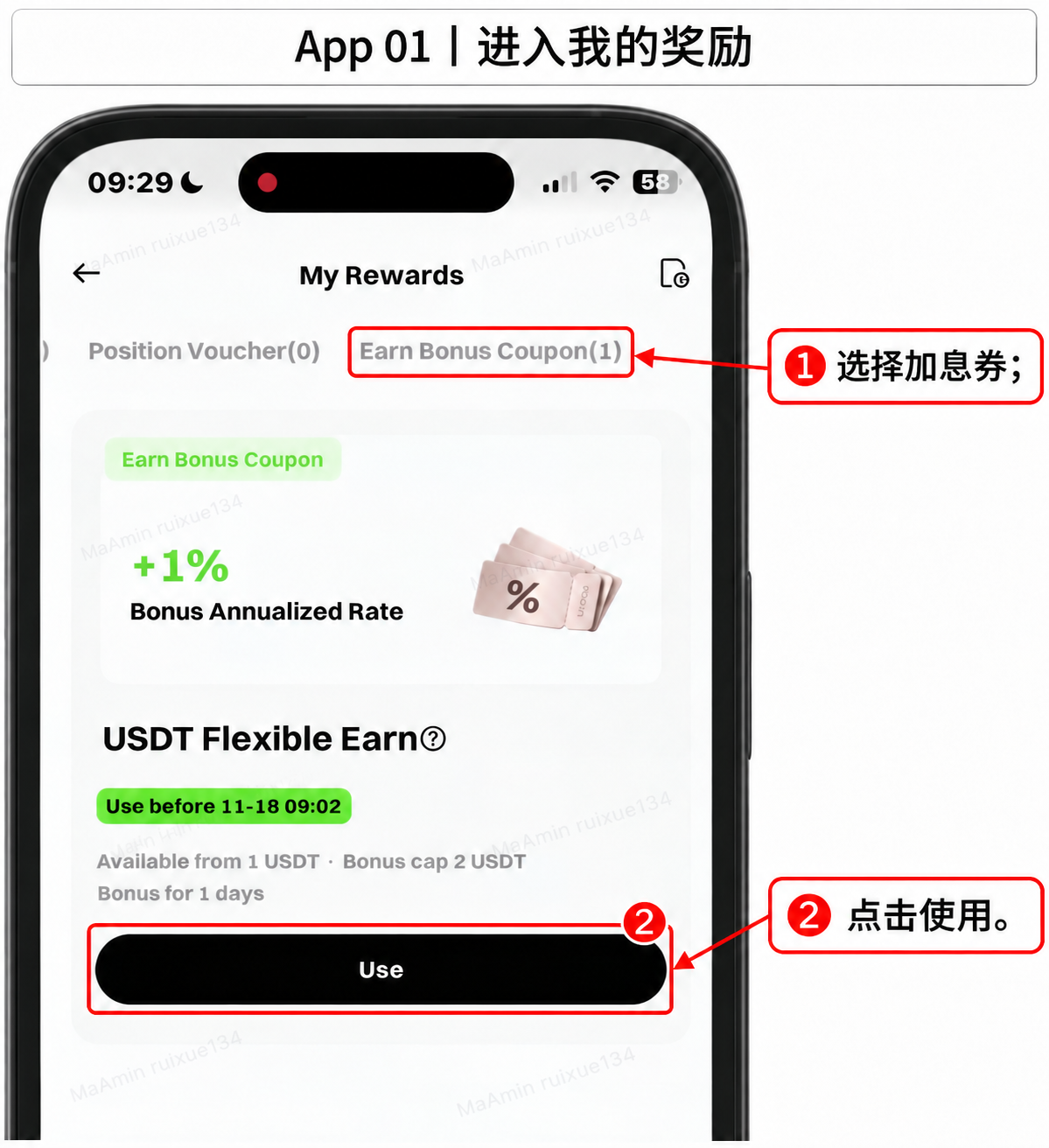
Open the MGBX App and navigate to Welfare Center → My Reward. Select Earn Bonus Coupon to view the coupons available in your account.
Claiming and Using Your Coupon
Step 1: View Your Bonus Coupons
Find the coupon you want to use on the Earn Bonus Coupon page and tap Use to proceed.
Step 2: Check the Coupon Terms
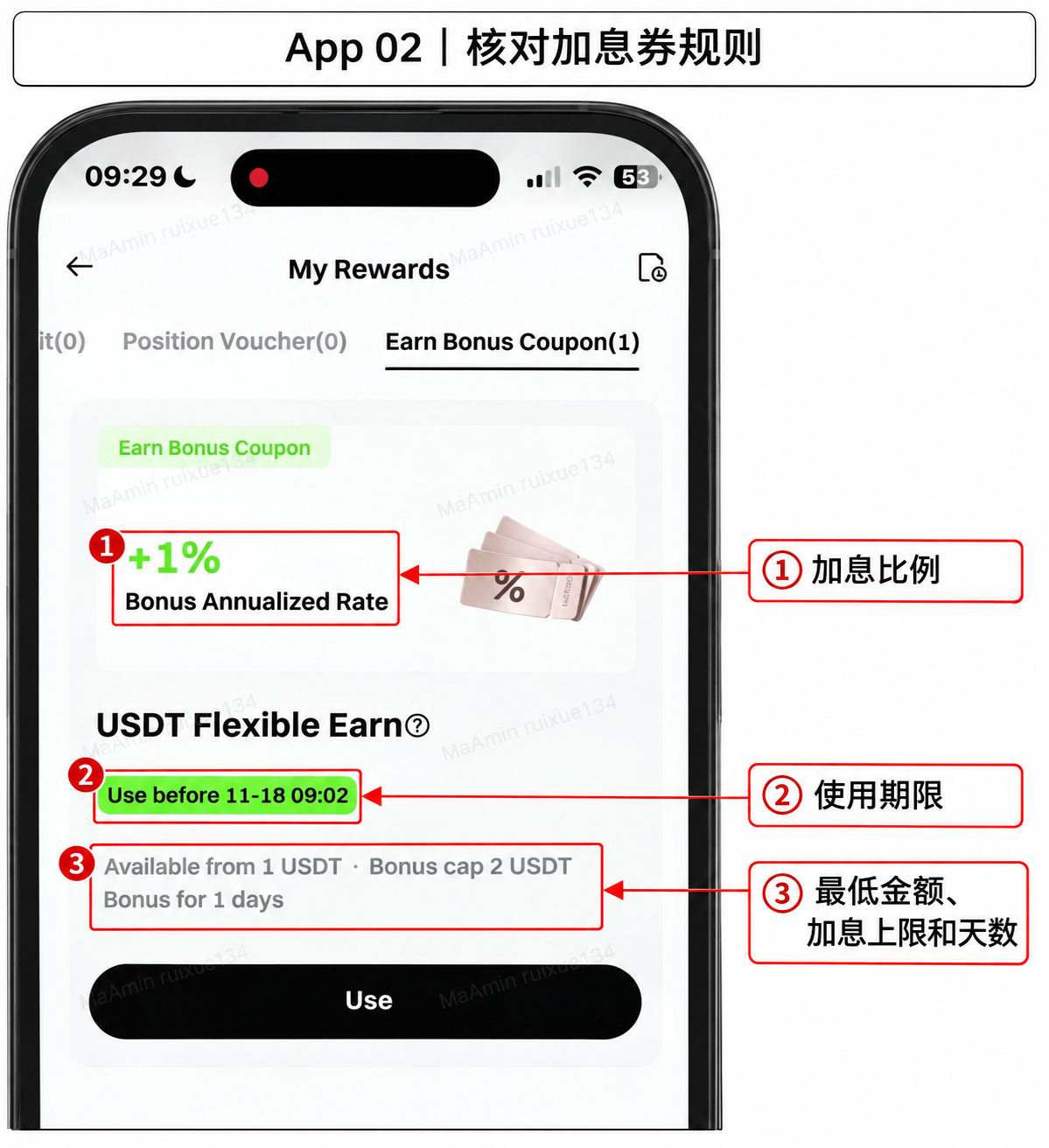
Review the coupon details carefully, paying particular attention to the bonus rate, validity period, minimum subscription amount, bonus cap, and bonus duration. Make sure the coupon meets your subscription requirements.
Step 3: Select an Earn Product and Apply the Coupon
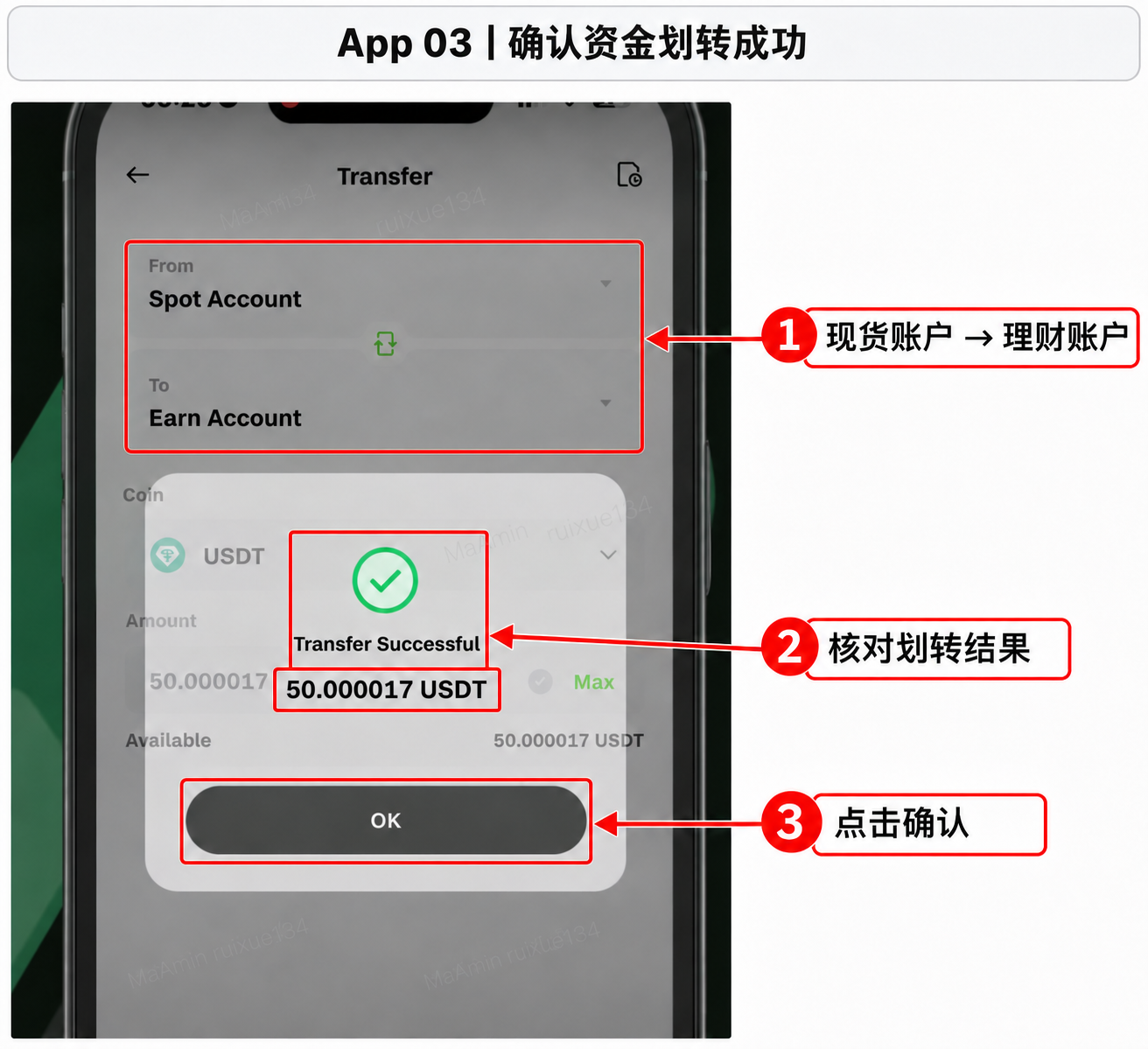
Navigate to a Flexible Earn product that supports bonus coupons and enter your subscription amount. Under the Bonus Coupon section, confirm that the correct coupon has been selected.
Check the estimated annualized rate and estimated daily earnings after the bonus is applied. Read and agree to the relevant terms, then tap Purchase to complete your subscription.
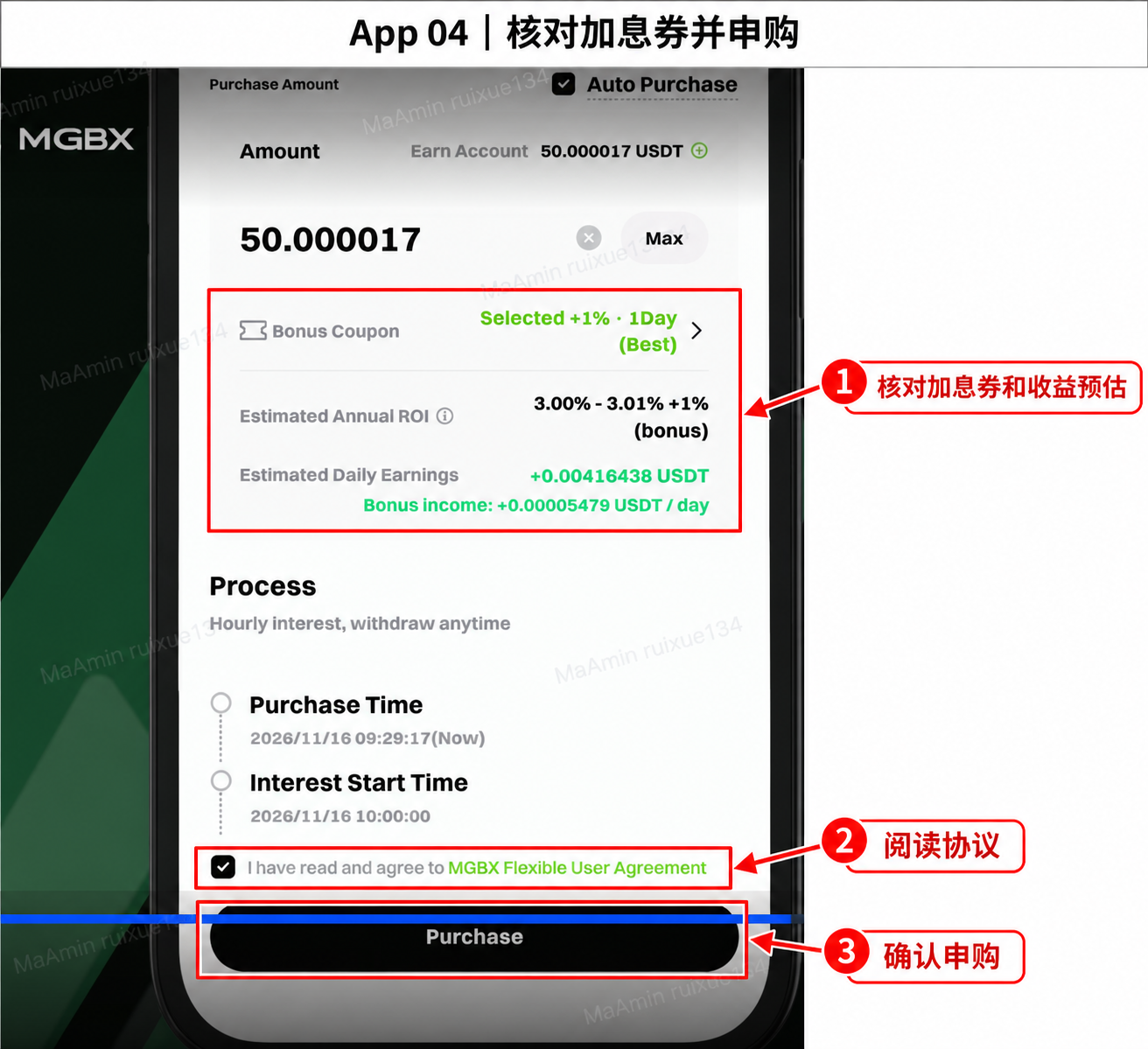
Step 4: View Your Bonus Position and Earnings Details
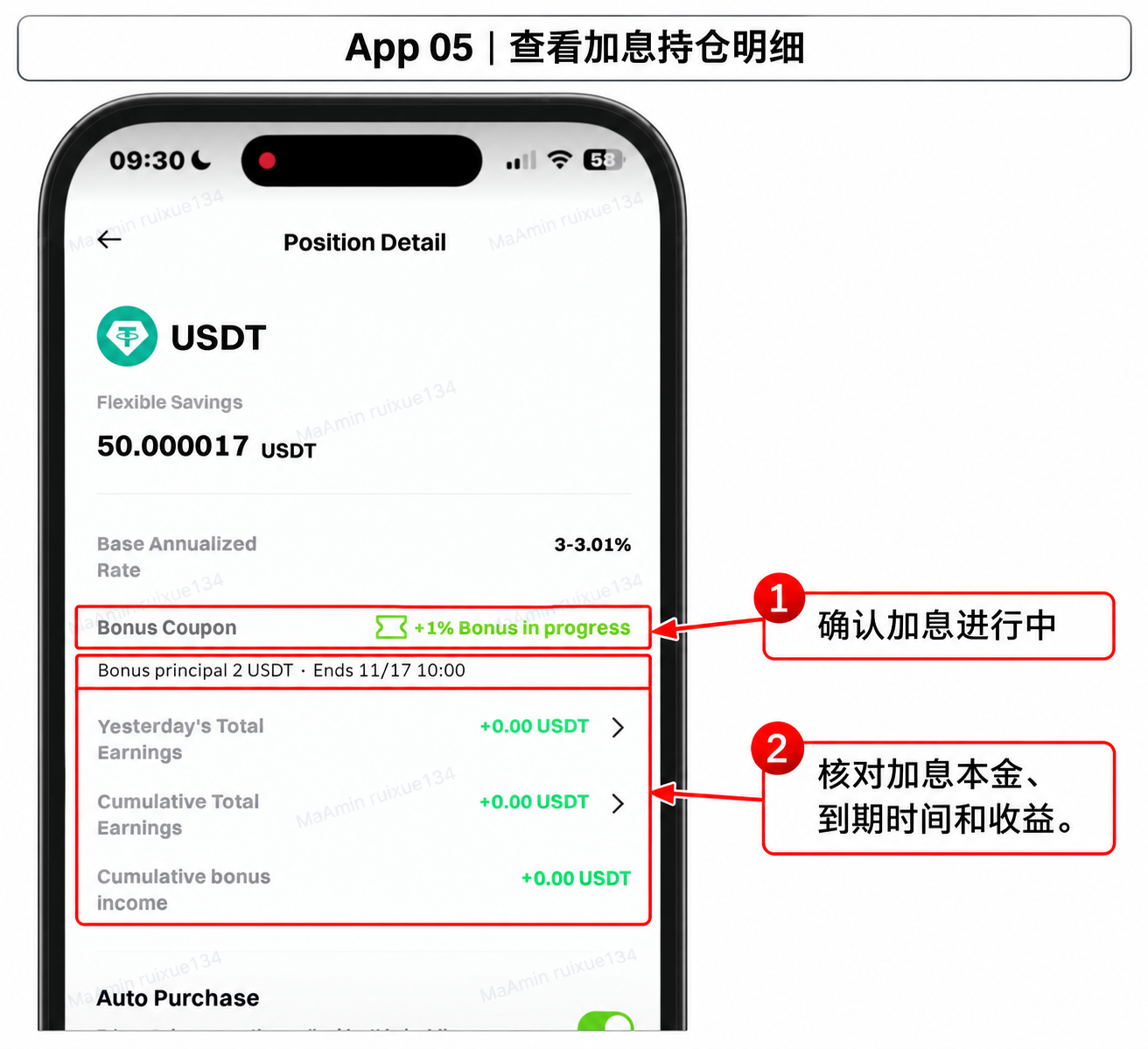
After a successful subscription, go to your Earn positions, select the relevant asset position, and open the bonus position details.
Pay particular attention to the following information:
Base Annualized Rate: The product's original annualized interest rate.
Bonus Coupon: The coupon's application status and additional interest rate.
Bonus Principal: The amount eligible for the bonus.
Ends: The bonus expiration time.
The position details allow you to check whether the coupon has been successfully applied and track your accumulated base earnings and additional bonus earnings.
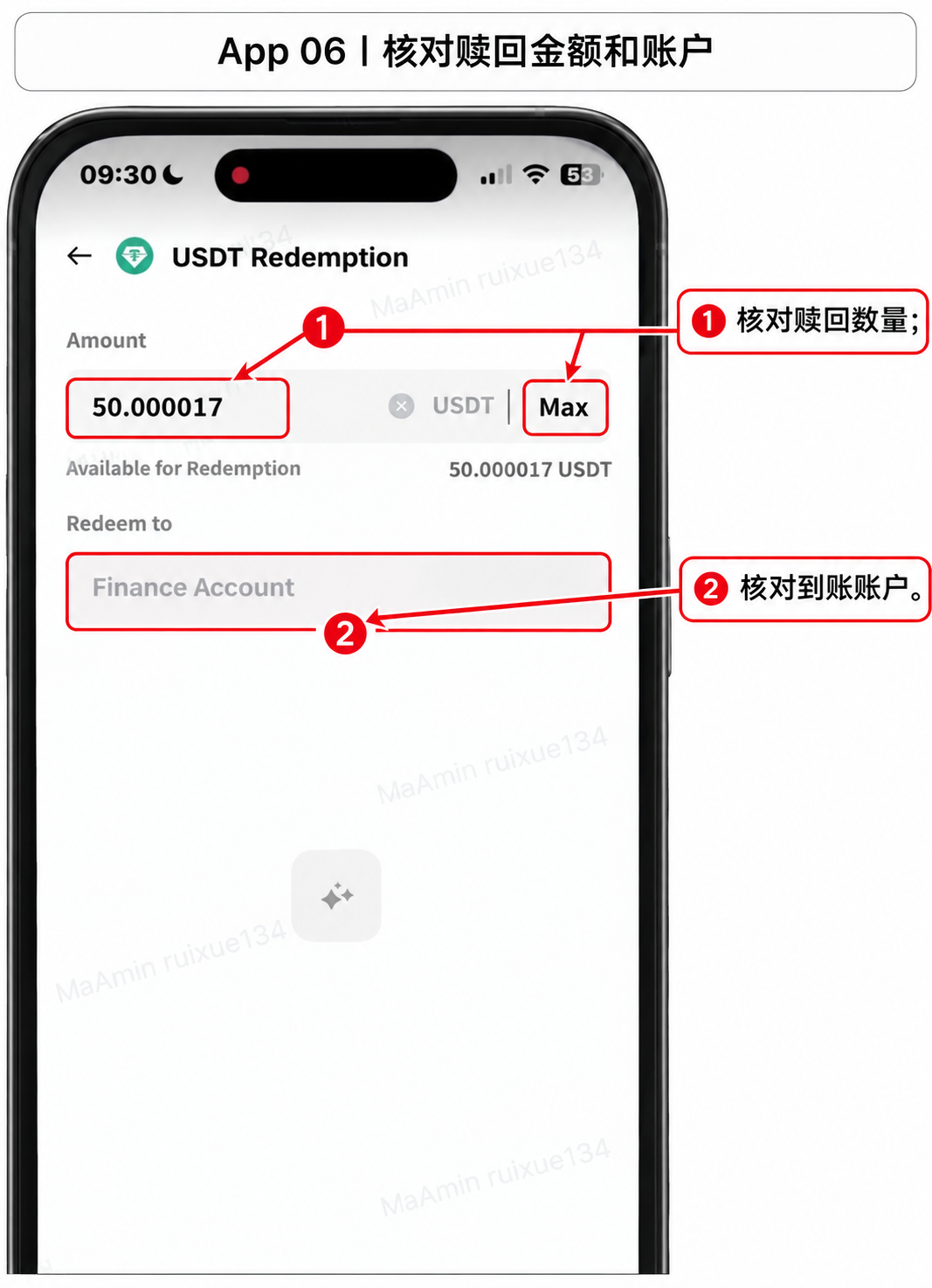
Step 5: Redeem Your Earn Assets and Check the Receiving Account
To redeem your Earn assets, open the relevant Earn product page and select Redeem.
Enter the amount you want to redeem. Depending on the available options, you may also select the maximum redeemable amount.
Before submitting, carefully check the redemption amount and destination account. Once all details are correct, follow the on-screen instructions to complete the redemption.
II. Web Guide: Claiming and Using Earn Bonus Coupons
Accessing the Entry Point
Log in to the MGBX website and navigate to Welfare Center → My Rewards. Select Boost Voucher to view the coupons available in your account.
Claiming and Using Your Coupon
Step 1: View and Select a Bonus Coupon
Find the coupon you want to use on the Boost Voucher page and click Use Now to proceed.
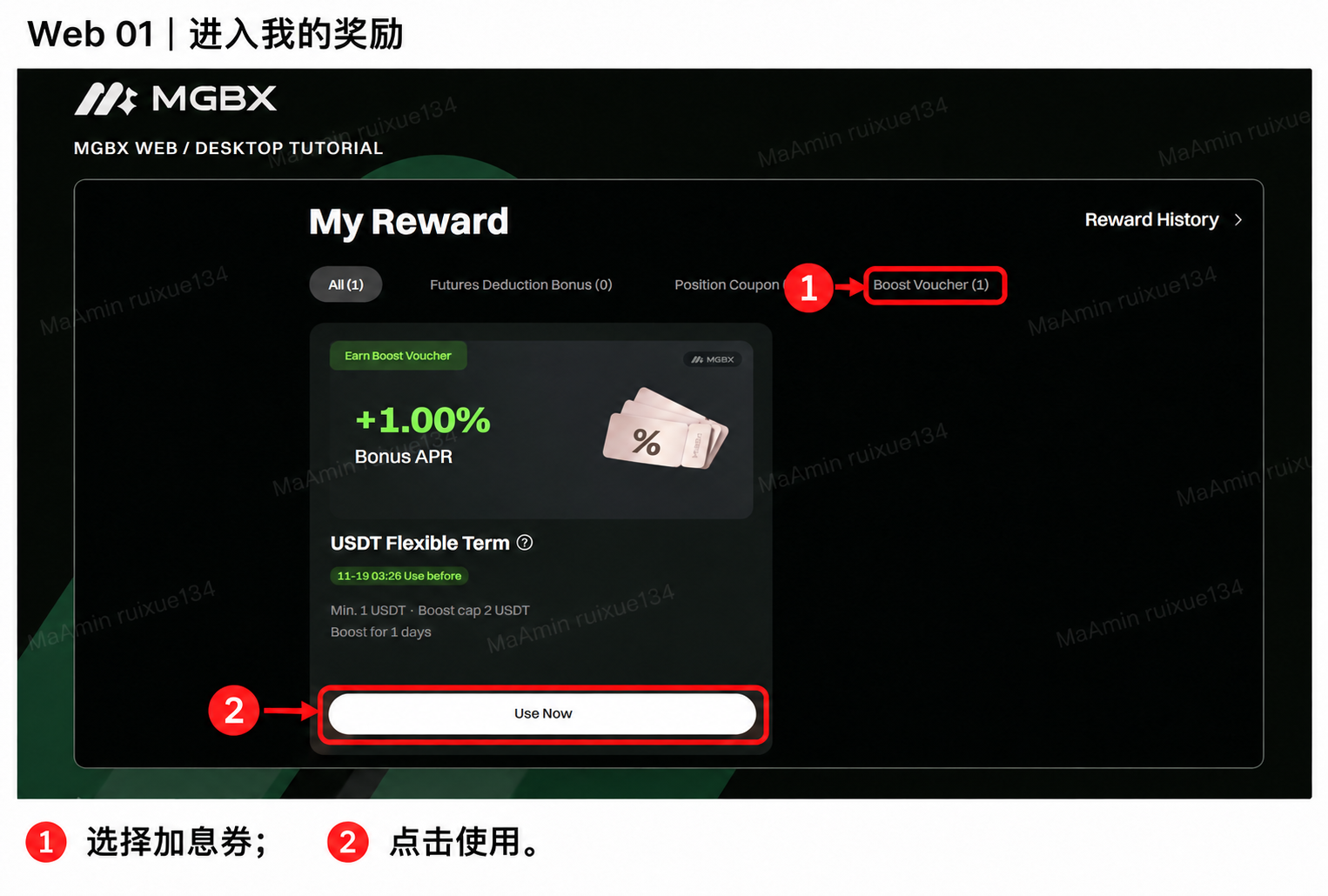
Step 2: Check the Coupon Terms
Review the bonus rate, expiration date, minimum subscription amount, bonus cap, and bonus duration displayed on the coupon. Make sure you meet all the requirements before proceeding.
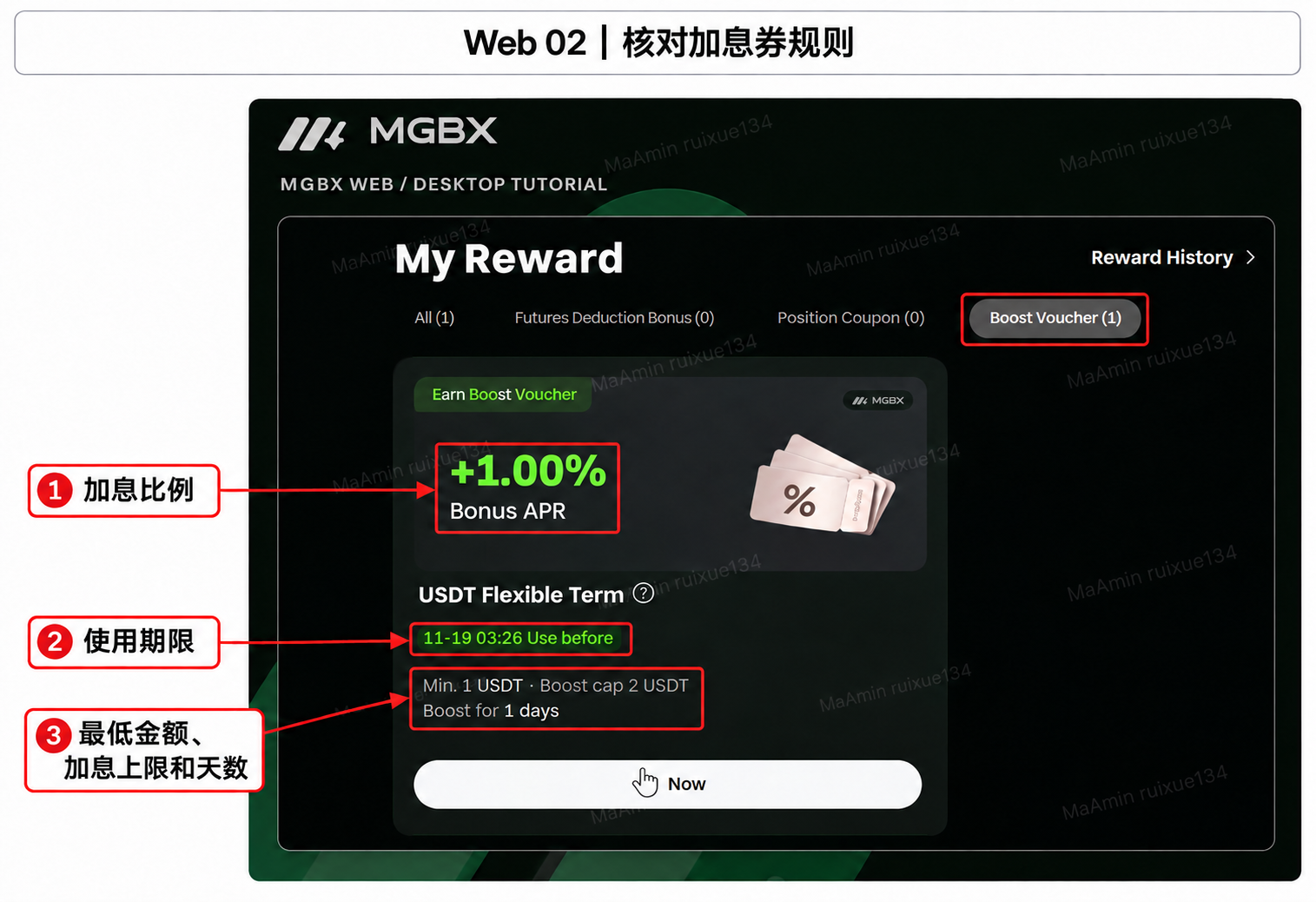
Step 3: Select and Confirm Your Bonus Coupon
Navigate to a Flexible Earn product that supports bonus coupons and enter your subscription amount. Click Boost Voucher and select the coupon you want to apply from the pop-up window.
After confirming the coupon terms, click Confirm. Return to the subscription page and review the estimated annualized rate and estimated earnings after the bonus is applied. Read and agree to the relevant terms, then click Purchase to complete the subscription.
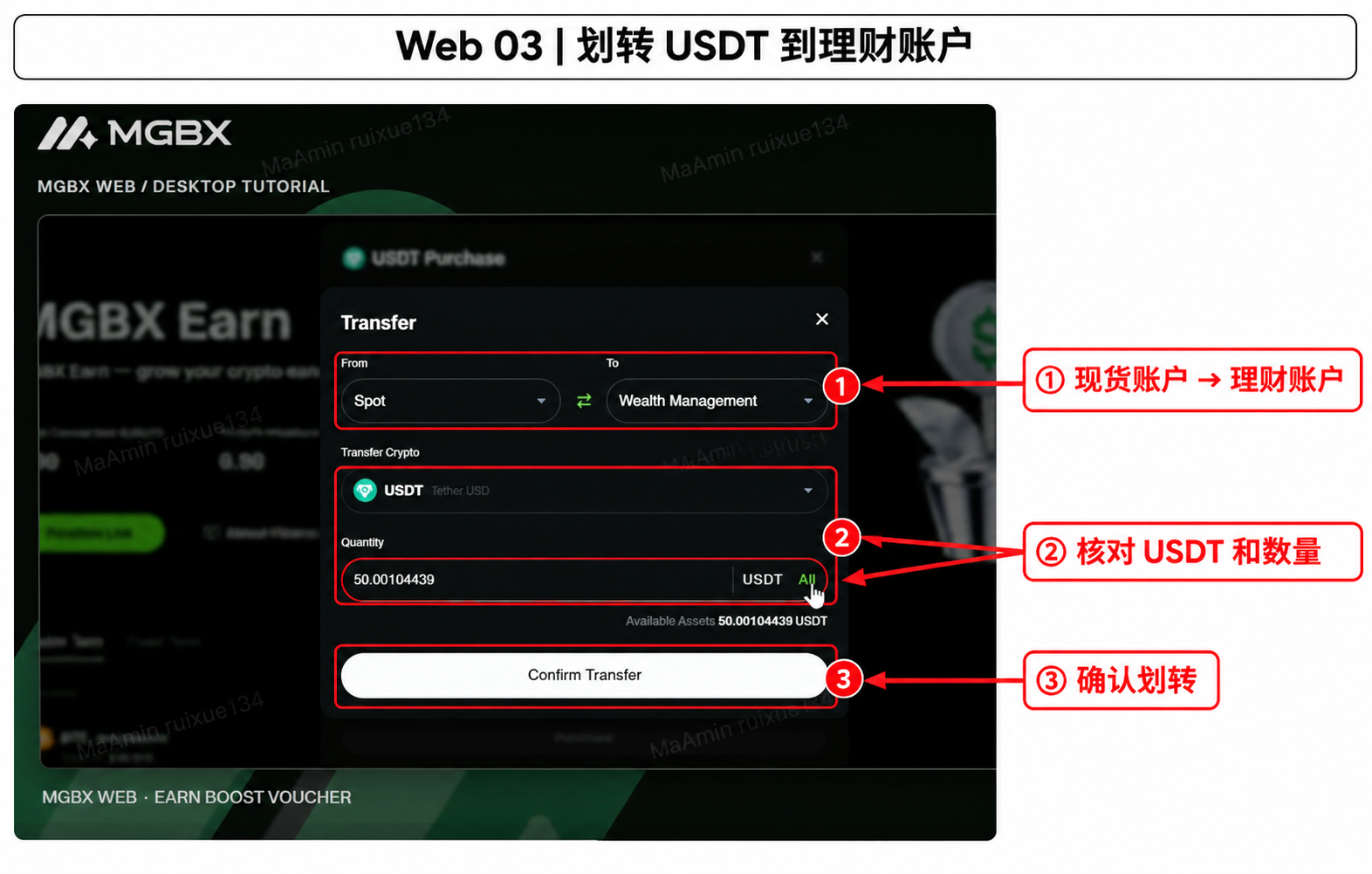
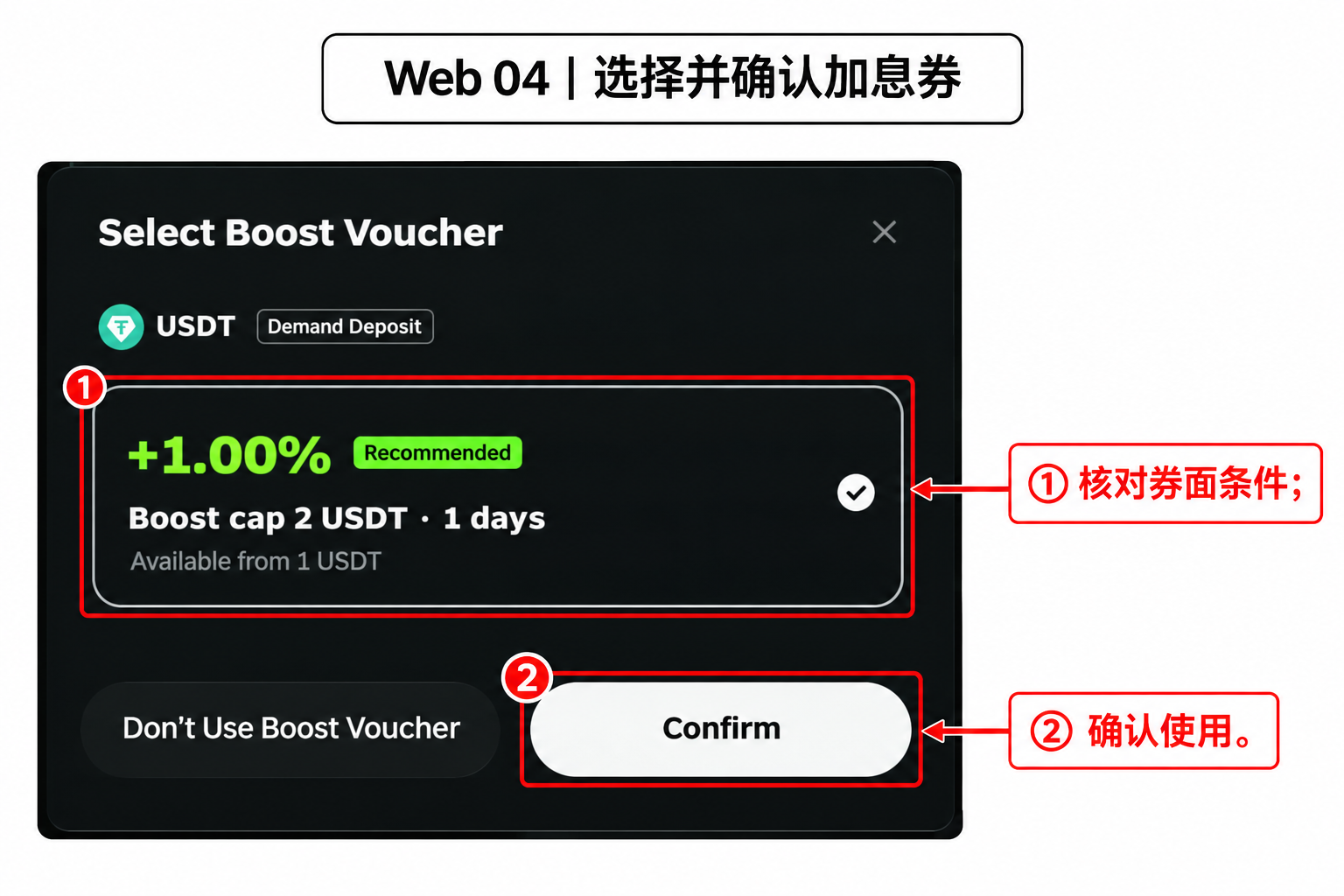
Step 4: Review Your Successful Subscription Receipt
After a successful subscription, the system will display a purchase confirmation.
Check the following details:
Purchase Successful: Confirms that the subscription was completed successfully.
Purchase Amount: The amount subscribed.
Purchase Time: The time of subscription.
Interest Start Time: When interest accrual begins.
Interest Distribution: The scheduled interest distribution time.
Reference APR: The reference annualized rate, including the bonus coupon.
Once all details are verified, click View Positions to check your Earn holdings.
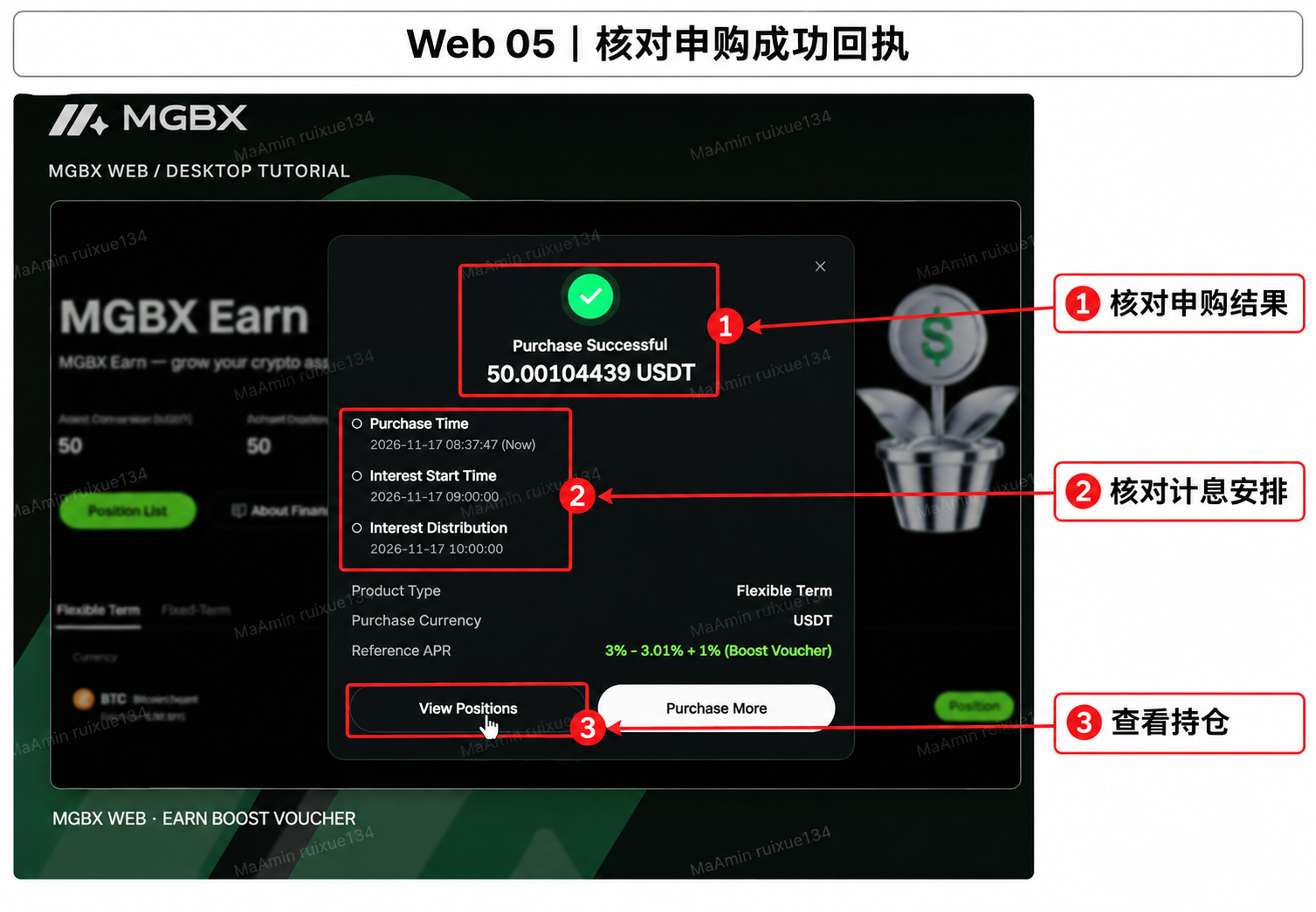
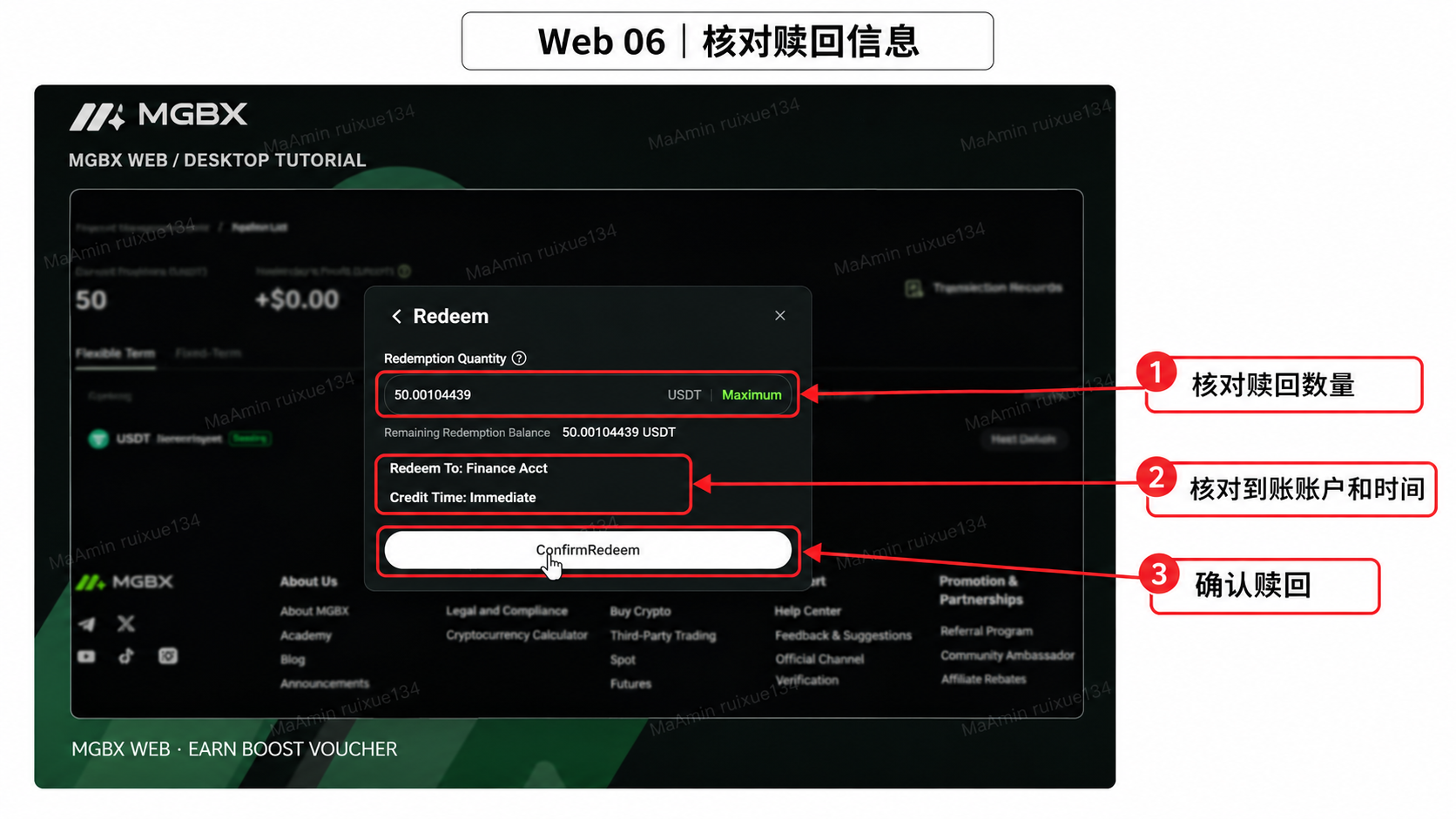
Step 5: Review and Confirm Redemption Details
To redeem your Earn assets, open the relevant position and select Redeem.
Enter the amount you want to redeem and check the following details:
Redemption Quantity: The amount to be redeemed.
Redeem To: The destination account for the redeemed assets.
Credit Time: The estimated time for the assets to be credited.
After confirming the redemption amount, destination account, and estimated credit time, click Confirm Redeem to complete the process.
III. Important Notes
Coupon requirements may vary. Always refer to the terms displayed on the individual coupon.
Bonus rates, minimum subscription amounts, bonus caps, and bonus durations may differ depending on the promotion.
Make sure to use your coupon before its expiration date. Expired coupons may no longer be available for use.
Estimated annualized rates and daily earnings shown in the examples are for reference only. Actual earnings are subject to the platform's final settlement.
IV. Frequently Asked Questions
Will the additional earnings from a bonus coupon replace the original interest earned from the product?
No. A bonus coupon provides additional interest on top of the product's existing base earnings. The actual bonus rate and earnings are subject to the coupon terms and subscription page.Why do different bonus coupons have different minimum subscription amounts, bonus caps, and validity periods?
Different coupons may have different promotional terms. Minimum subscription amounts, bonus caps, and bonus durations can vary. Always refer to the specific conditions displayed on each coupon.How can I obtain an Earn Bonus Coupon?
Users may receive bonus coupons by completing designated tasks available in the Welfare Center or through MGBX official campaigns. Eligibility and reward distribution are subject to the relevant task or campaign rules. These tasks and campaigns are not permanently available, so check the Task Center regularly for new opportunities.After completing a task or participating in a campaign, how can I know if I have received a bonus coupon?
The notification and claiming process depends on how the reward is distributed.
After completing an eligible Welfare Center task, follow the on-screen instructions to claim your coupon.
For campaign rewards, wait until distribution is completed, then manually navigate to Welfare Center → My Rewards to check your account. We recommend checking your rewards page regularly so you don't miss any available coupons.Can I use a bonus coupon if my subscription amount does not meet its minimum requirement?
No. If a coupon specifies a minimum subscription amount, your subscription must meet that requirement to qualify. Check the coupon terms before subscribing to avoid an unsuccessful application.If I receive a reminder but fail to claim my coupon in time, can I still claim it afterward?
The system sends an in-app message reminder when a coupon's claiming period is approaching its expiration. Once the stated claiming period has ended, the coupon may no longer be available to claim. Receiving a reminder does not extend the expiration date. Visit the Welfare Center and claim available coupons before they expire.